A quick detour - Gemini as a blog post reviewer
A Reluctant Editor
My blog is written in markdown using a combination of Cloudflare Pages and Vitepress with some analytics bolted on using my self-hosted version of Matomo. It works pretty well but there's a part of the workflow that isn't a great fit.
I'm not great at reviewing my own content. I generally have a reasonable way of mapping out my journey from thoughts to implementation in a way that is legible and also uses my own personal style and tone, but I make plenty of typos and broader drifts along the way that need some level of editorial review.
My partner Heidi is the person I turn to for editorial review, and frankly it's a job she'd rather not have. She hears enough about all the stuff I'm tinkering with through the weekends verbally as the only captive audience polite enough not to walk away (my Kids would absolutely just leave... and do).
So today when I wrote out my latest blog post, I decided to test out Gemini from my google workspace for review of the post from a draft copy. The result was okay enough that I thought it was worth a deeper dive.
Question
Could I automate some AI based review of my content into my GitHub workflow for the blog?
Building a Plan
GitHub, like most of the more popular git based solutions provides automation through its provision of runners that can be triggered on key events within the git workflow.
The way my vitepress/pages setup works is as follows:
- The main site is automatically built from the main branch of the repo, with any commit or PR merge to this branch resulting in a new build.
- Branches create draft sites that can be validated once built on unique temporary site provided by Cloudflare.
- When I develop new content, I write it in a new branch, validate the visual elements in the temporary site, then raise a PR when I believe it is ready to go live.
So my guess at a good spot to introduce an editor is at the point a pull request (PR) is raised. PRs are designed to capture feedback and review, and have some good ways of presenting this back to the person who raised the request.
Building an Action the Lazy Way
While I could spend a few days mucking around with GitHub's yaml format, this problem seemed to be a rather safe one to pass to AI to help solve... so I took a trip over to Gemini's chatbot to try and see what I could achieve.
First two Hours - Iterating
Within a few minutes of building out the proposal I had a draft example that was leveraging commands and process that I was comfortable with, but it then took a few hours to get right.
Validating External Code
It's always important when using any external code (AI generated or from the more traditional stack overflow-like sources) that you either:
- Understand what it does or
- Have enough guardrails and tests wrapped around it that you can validate what it does with rigor.
TIP
Achieving 1. is much easier than 2., but as we use AI more we're probably going to need to get more comfortable with the latter.
Gemini's browser based agent made a good start on the structure but as I encountered errors in agent runs the copy/paste between the browser chat and VS Code was starting to become time consuming, so I switched to Gemini in VS Code.
The design shifted through several iterations:
- Initially the system leveraged a node instance of Gemini CLI.
- Several issues were encountered with both the setup of this CLI and in navigation to files. While I never quite got to the root cause of this, the alternative of shifting to direct API calls and leveraging curl within the agent seemed an acceptable trade off, and worked.
- From that point a lot of the additional work was in:
- Refining the prompt with additional context.
- Adding a manual invocation on an existing markdown file for easier testing, and finally
- Tweaking the output so that feedback was pushed as a pull request comment, consolidated for multiple files.
An Amusing Encounter - Self Congratulations
The Gemini Agent had recommended the use of a separate styleguide.md file to feed additional context into the API call, which also fit the filter for markdown file review.
The Agent happily reviewed this file and made quite a few recommendations on how to adapt this to the recommended style of the blog. Seeing no harm in this, I applied the changes and resubmitted the pull request.
Gemini Self-Review
This style guide looks solid and does a great job of practicing what it preaches! Here is a quick review of the document based on the rules you've established:...Overall, this is a clear, friendly, and well-structured guide!
I'll admit I had a bit of a chuckle over how well the Agent praised its own content.
Putting Things Together
With the PR action in place, I went through several iterations of corrections on my last post. The agent identified a few typos and structural discrepancies I'd missed, and in further iterations hit a few recommendations that I was happy to call 'good enough' on.
Cost vs Benefit Analysis
So far the exercise from start to finish ended up in the realms of about $0.64 USD.
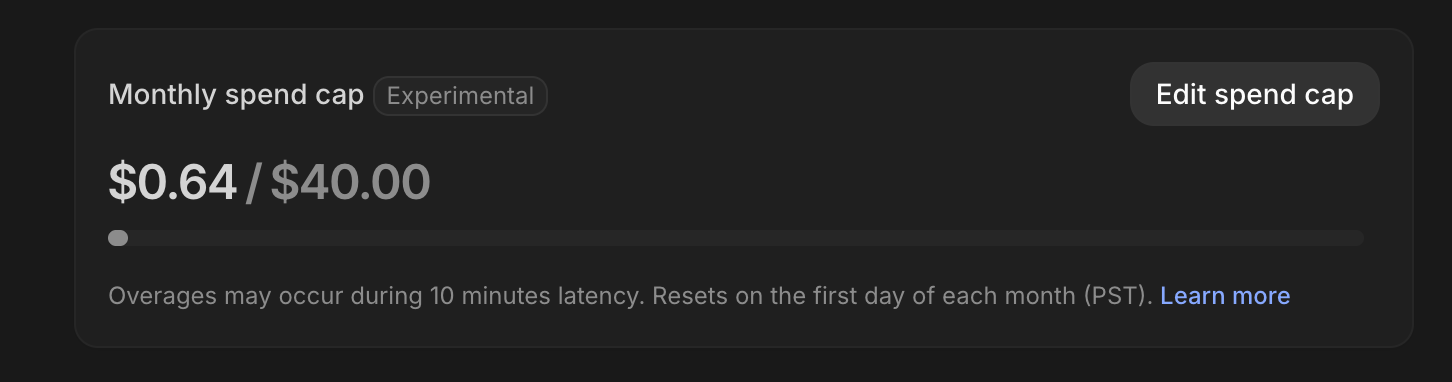
As a personal blog and with Heidi helping as a favour I can't truly assign that a dollar value, but can ask for her opinion on whether that is money well spent.
Heidi's Response
Note At this point in the evening Heidi was already mentally checked out from all the stuff I was getting up to...
Joel: "So is 64 cents a worthwhile investment to save you this time?"
Heidi: "Yes." subtext: now go away dear, I'm busy