Full Backup with Storage
Where we left off
In my last update while successfully backing up the state of the cluster and all objects to Cloudflare's R2 storage, I'd identified that Velero doesn't back up snapshots by default. It does offer this service though using a combination of Kubernetes standard CSI and some additional plugins and configuration.
At this point I hit a potential hobbyist concern. My allocated storage is 35GB and I'd like to be careful about my online costs for a backup solution and I'd like to understand what this looks like in terms of file volume and data volume before I go spending money to push it online.
Testing volume snapshot backup locally
No Luck with Minio
Initially I selected Minio due to it's general availability and apparent feature parity with AWS S3. Setup and creation of an appropriate set of API keys for access was relatively straight forward, but unfortunately I immediately began to encounter signature mismatch errors that I was unable to resolve. Minio and Velero apparently both support the current v4 version of signing that the S3 libraries use, but for some reason this was not working as expected. Might have had something to do with the service hosting on multiple IP addresses on my mac mini and using the wrong public URL, but after roughly four hours of testing different configurations with no luck, I decided to move onto a different service.
Attempt 2: Garage
I settled on garage as a next attempt, which while lacking a UI did have a very straight forward quickstart guide and console based config that allowed me to get a server, bucket and API key up and running very quickly. After all the fun with minio I validated this worked with AWS's S3 CLI commands first.

With that working I proceeded to set up a new storage location in Velero with the configured Garage credentials and bucket.
velero backup-location create osx-test \
    --provider aws \
    --bucket backup-bucket --config region=garage \
    --config s3Url=http://192.168.87.4:3900 \
    --config s3ForcePathStyle=true \
    --config signatureVersion=4\
    --config checksumAlgorithm="" \
    --credential os-backup-test=cloud
Velero validates that a backup location is active and this can be validated using the command velero get backup-location as shown below:
velero get backup-location
NAME         PROVIDER   BUCKET/PREFIX    PHASE       LAST VALIDATED                   ACCESS MODE   DEFAULT
cloudflare   aws        k8s-dev-backup   Available   2026-03-08 08:06:32 +1000 AEST   ReadWrite     true
osx-test     aws        backup-bucket    Available   2026-03-08 08:06:32 +1000 AEST   ReadWrite
The key element being that the phase of both backup locations is 'Available' - which indicates that connectivity and some basic validation has been successful.
At this point it's also worth clarifying that there are some additional Velero install and configure options that are required to get all of this to work successfully.
Install flags
The Velero CSI feature must be enabled either during install or as a flag on the velero deployment
--features=EnableCSI.Velero needs to leverage a daemonset for snapshot copy actions. Without this snapshot copy activities will simply sit in a pending state and never run.
--use-node-agent.
Additional configuration
- You must have a VolumeSnapshotClass available for use - for Rook I followed the Volume Group Snapshots guide which involved both some additional CRDs from kubernetes-csi and the CSI snapshotter.
- If you have multiple VolumeSnapshotClass objects configured, you may need to ensure that appropriate labels are on these objects to help Velero select the appropriate class to use.
Testing
A full backup is then a matter of adding the additional flag --snapshot-move-data to a velero backup command. For example:
velero backup create --storage-location osx-test --snapshot-move-data mytestbupFrom there Velero will perform its usual backup, but also:
- Mount the snapshot.
- Using kopia, backup the snapshot to a subfolder of "<bucket-name>/kopia".
The backup activity can be observed by viewing the DataUpload object in kubernetes.
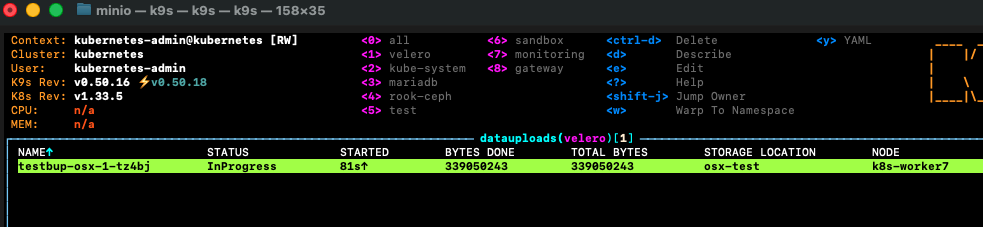
After inspecting the result, I was able to validate that my expected payload size for my 35GB volume is only the currently used storage volume of approximately 250 Megabytes. So well within my online backup budget.
Full Backup
Shifting to a full backup after validation was extremely simple, I only needed to remove the --storage-location flag and pick an appropriate backup name.
velero create backup cloudflare-full-storage --snapshot-move-data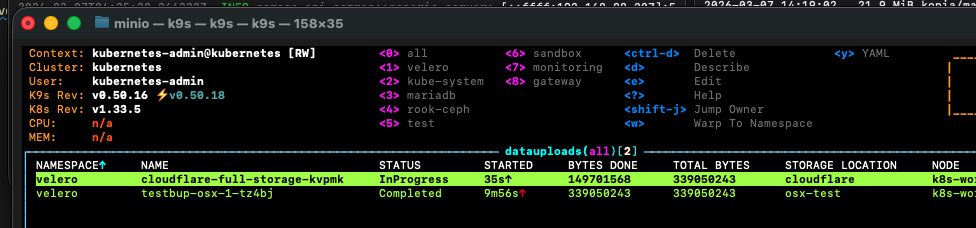
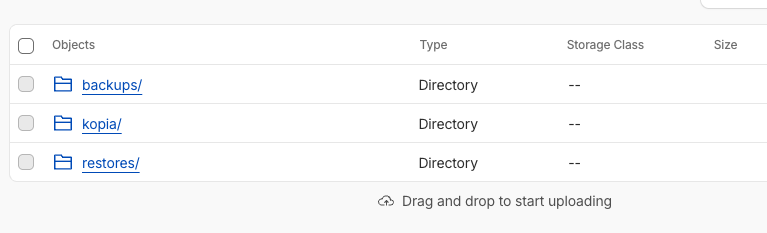
From there the resulting R2 bucket contained the new kopia folder and associated data.
Scheduling
Velero uses cron-based logic for backup scheduling, and given the rough size of my backup and the hobbyist nature of this platform I've settled on weekly.
Scheduling is rather trivial once we've established what to back up and validated backup of volume snapshots.
velero schedule create --snapshot-move-data weekly-full-bup --schedule="0 0 * * 0"... and to validate the schedule with a first run:
velero backup create --from-schedule weekly-full-bupWrapping up and what is next
In terms of objectives for this setup I now have a full backup of the platform stored in a secured offsite location, but I haven't truly proven out the restore path yet.
Recovery test
As a next step, I think I'll go through a limited disaster recovery exercise and simulate a full loss of my mariadb namespace and associated data. If this all works as it should, a recovery using velero will:
- Restore the namespace and all objects
- Restore the database and file contents to a new persistent volume containing the data backed up in the most recent snapshot via Kopia.
Complexity and Broader Application
Complexity wise setting this up was rather tricky, but once done I have a well defined, highly flexible and configurable backup solution for the cluster that would scale extremely well beyond my use up to enterprise requirements.
Monitoring and Alerting
I would like to try and ensure that appropriate monitoring is in place from my Grafana and Loki monitoring stack to ensure that I am aware when a backup fails or something goes wrong.
While for my purposes this probably isn't a deal-breaker it's really important when something becomes more than just a home project to make sure you can be alerted when anomalies occur, and also have the ability to figure out the underlying cause through log and metric data.